Click for larger image
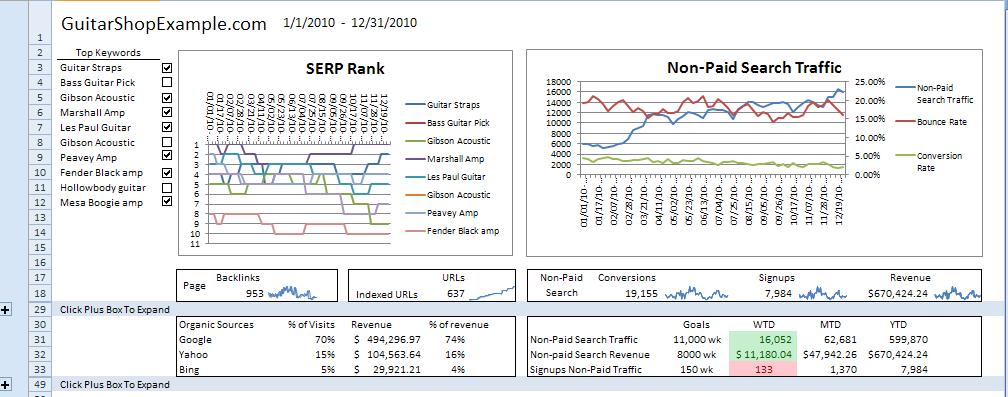
Starting in the top left coroner is the rank of your top 10 keywords which you can compare to each other by clicking the check boxes. The graph next to it is total traffic, bounce rate and conversion rate from non-paid search traffic. Seeing bounce rate going up and conversion rate going down would be cause for concern and you would want to look at top referring keywords to see who is driving the crappy traffic. Below that graph is conversions, sign-ups and revenue (or whatever other micro-conversions you want to track) from all non-paid search. I have spaklines in-cell graphs for those metrics to give an idea of where they are trending.
Next to those metrics are the total backlinks and indexed URLs metrics. I would pull these metrics from Google Webmaster Tools but there are others tools that can give you the same information. The more indexed URLs the better the chance you have to get more traffic from those pages and tracking the number of backlinks is important since that’s how pages rank higher.
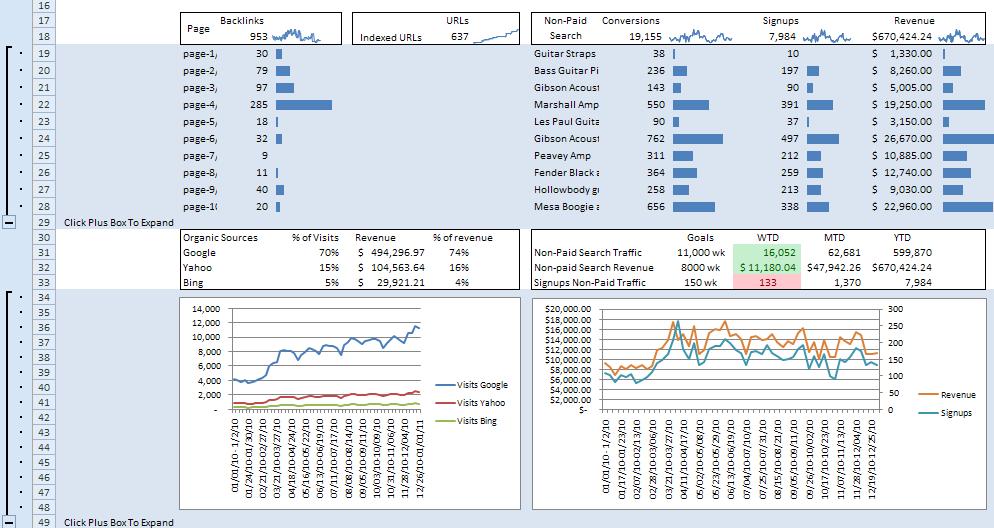
If you expand the plus box you can see the top 10 most linked to pages. And on the other side, conversions, sign-ups and revenue are segmented by those same top 10 keywords.
Click for larger image
Beneath that is the amount of traffic and revenue split up by search engine (not sure what kind of insights knowing this would give other than where to focus your efforts). And next to that are the goals which are custom formatted so that if the week-to-date number is below the goal it will turn red. Expanding the second plusbox shows traffic trends for the three engines and the other graph shows total sign-ups and revenue.
Download the SEO Dashboard.
Let me know what you think and what is missing from this dashboard in the comments.
If you like this post you may also like my PPC Dashboard and eCommerce Planning Dashboard posts.